Everything between "new printer" and "it just works"
One portal for every client or site you look after, and one small agent on each Windows machine that does what the portal says. Built for the MSP; works in any IT environment.
Clients, sites and machines
Each client, or each part of your organisation, is its own space, with its own sites, machines, drivers and history.
- Rules assign machines to sites by public address, local subnet or hostname pattern
- A default site per client, so a new machine is never left with no printers
- Per-client and per-site installers, and ready-made commands for NinjaOne, Datto RMM, ConnectWise Automate, Kaseya, N-central and Intune
- Nothing joins until a person approves the machine
Printer deployment
Describe a printer once - driver, address, settings - and attach it to a site.
- Every machine in the site installs it; machines joining later get it automatically
- Schedule a rollout for out of hours
- Remove a printer from one machine, a site or a whole client in one action
- Capture a printer's settings from a machine where it is already right
Staged rollouts
Change printers without changing everyone's day at once.
- Pilot machines first, then one site, then everyone
- A rollout pauses itself when installs start failing
- Roll back to the previous settings in one click
Self-healing
The everyday faults, fixed before anyone raises a ticket.
- Restarts a stopped print spooler, a few times a day at most
- Clears jobs stuck in a queue for over an hour
- Puts back managed printers a user deleted
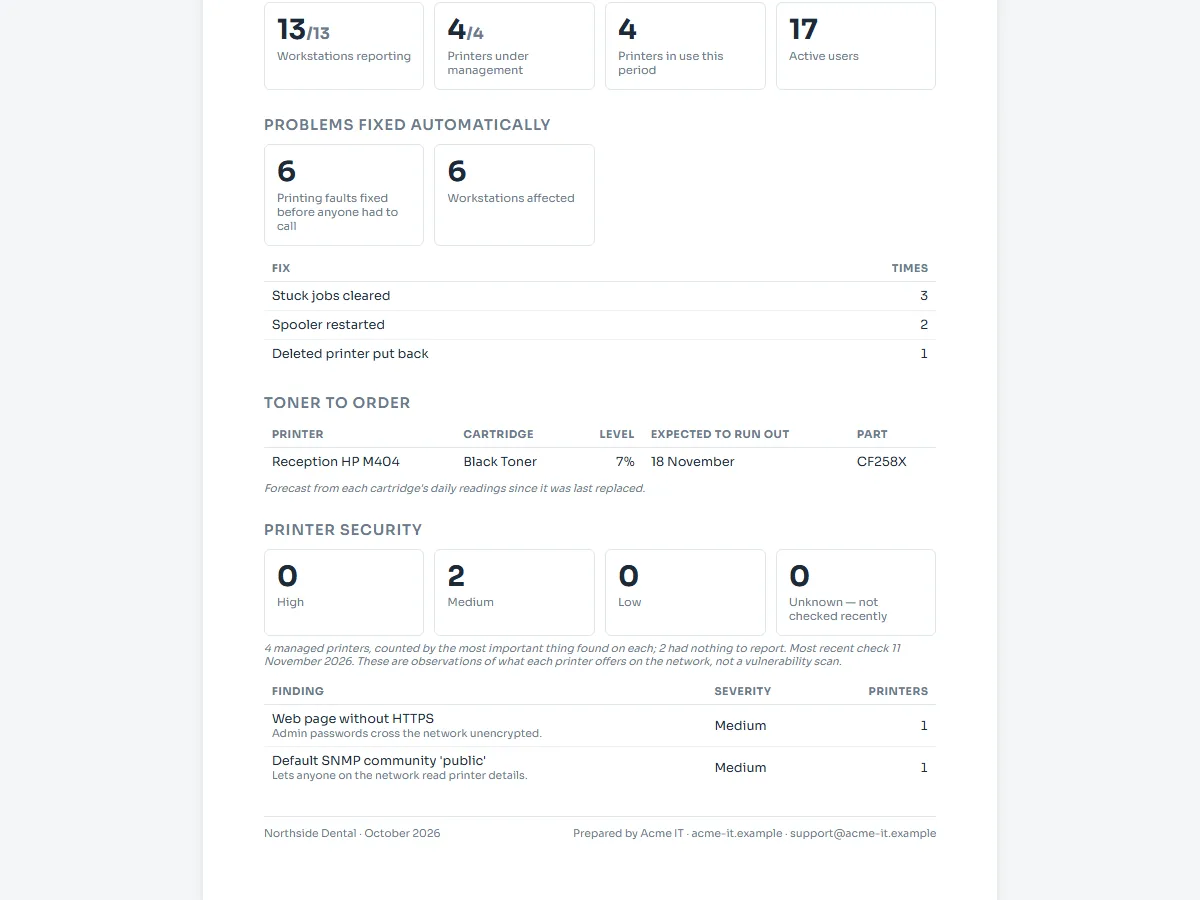
- Each fix switchable per client, and every fix counted on the client's report
Toner forecasting
Know what is about to run out, and order it in time.
- Days until each cartridge is empty, from its own usage, with the part number to order
- An alert when a cartridge is two weeks or 20% from empty, once per cartridge
- Alerts to your PSA or helpdesk, or to a webhook
Printer security
What each printer exposes, on the client's report.
- Services left open: Telnet, FTP, web admin, raw printing and more
- Printers that still answer SNMP with "public"
- Firmware compared across printers of the same model
- Read-only checks, on managed printers only; no passwords are tried
Print-server migration
Retire the print server without anyone losing a printer.
- Every shared queue on the server, with how many machines use each
- Drivers and settings collected from the server, printers deployed direct to their address
- Old
\\server\queueconnections removed only once the replacement is installed
Driver library
Upload driver packages, or collect the driver from a machine that already has it installed, instead of hunting for the vendor download.
- One library per client, plus a shared catalogue across your clients
- Only drivers certified by Microsoft, or that ship with Windows, are installed
- Drivers go to the machines that need them, when they need them
Keeping it right
Deployment is the easy half. Xenoprint notices when reality drifts from the plan.
- Printers that appear outside policy are reported as drift
- Optionally stop users adding printers of their own, per client or per machine
- Machines that stop checking in are flagged before anyone raises a ticket
- Agent updates are signed with a key we keep offline, so machines only ever run an agent we released
PSA, helpdesk and webhooks
Alerts go where your team already works.
- Tickets in your PSA or helpdesk through its email inbox
- Signed webhooks for automation tools such as Zapier, Make and n8n
- Toner, failed fixes, paused rollouts, machines offline and more
Reports under your brand
The numbers people ask about, without exporting spreadsheets by hand.
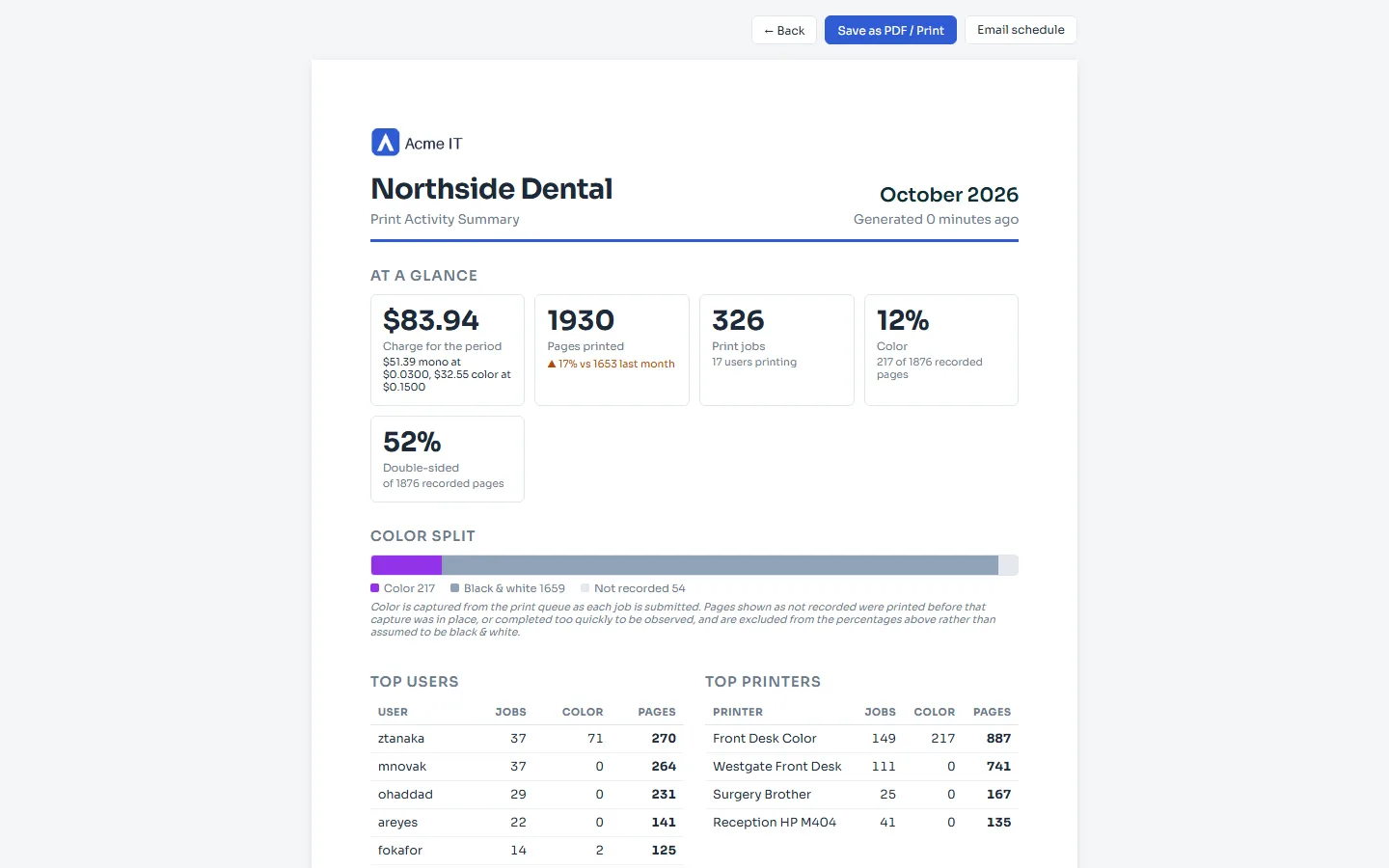
- Monthly reports emailed per client or department: problems fixed, toner to order, security findings, pages printed
- Your name, logo and colours on reports, report emails and the tray icon
- Print activity by machine, printer and user, and usage exports for billing
- Document names left out unless you turn them on for a client
- An audit log of every administrative change, per client
Remote printing
Print to a site's printer from home, another branch or the car park, as though you were in the building.
- No VPN, no port forwarding, nothing to change on anyone's router
- Jobs travel encrypted between Xenoprint agents over outbound HTTPS
- Tell me when it's ready
Screens
The portal as a customer sees it, with an invented company's data. Select any screen to see it full size.



See it on your own sites
30 days free during the beta, unlimited agents.