Printer problems fixed before anyone calls.
Xenoprint puts the right printers on every Windows machine at every site, fixes the everyday faults on its own, and sends a monthly report under your brand that shows what it handled. No GPOs, no login scripts, no print server, no site visit.
Closed beta: free for 30 days with unlimited agents, by invitation. Request access and we'll add you.
Printers stop being a ticket category
Built by an MSP for the job printers actually are: many sites, many drivers, and the one printer in reception everybody depends on. Whether those sites are your clients' or your own organisation's, it works the same way.
Deploy by site
Rules place each machine in the right site by public address, subnet or hostname, and the site's printers and drivers follow it there, including on machines that join later.
Fixes itself
Restarts a stopped print spooler, clears jobs stuck in a queue and puts back printers a user deleted. Each fix can be switched off per client, and every one is counted.
Toner before it runs out
Forecasts when each cartridge will be empty from its own usage, with the part number to order, and raises an alert two weeks ahead.
Roll out in stages
Pilot machines first, then one site, then everyone. A rollout pauses itself when installs start failing, and rolls back to the previous settings in one click.
Printer security
Which printers still have Telnet, FTP or an open web admin, which still answer SNMP "public", and whose firmware is behind others of the same model.
Retire the print server
Move every shared queue to direct printing in one guided step, without anyone losing a printer along the way. How it works
Your PSA, your RMM
Alerts arrive as tickets in your PSA or helpdesk by email, or anywhere by signed webhook. Deploy the agent with ready-made commands for NinjaOne, Datto RMM, ConnectWise Automate, Kaseya, N-central and Intune.
Reports under your brand
Your name, logo and colours on monthly reports, report emails and the tray icon on every machine. Print volumes and usage exports for billing, per client or per department.
Keeps it that way
Printers that appear outside policy are flagged, and you can stop users adding their own. Machines that go quiet are noticed before anyone else does.
See it before you install it
The portal as a customer sees it, with an invented company's data. Select any screen to see it full size.

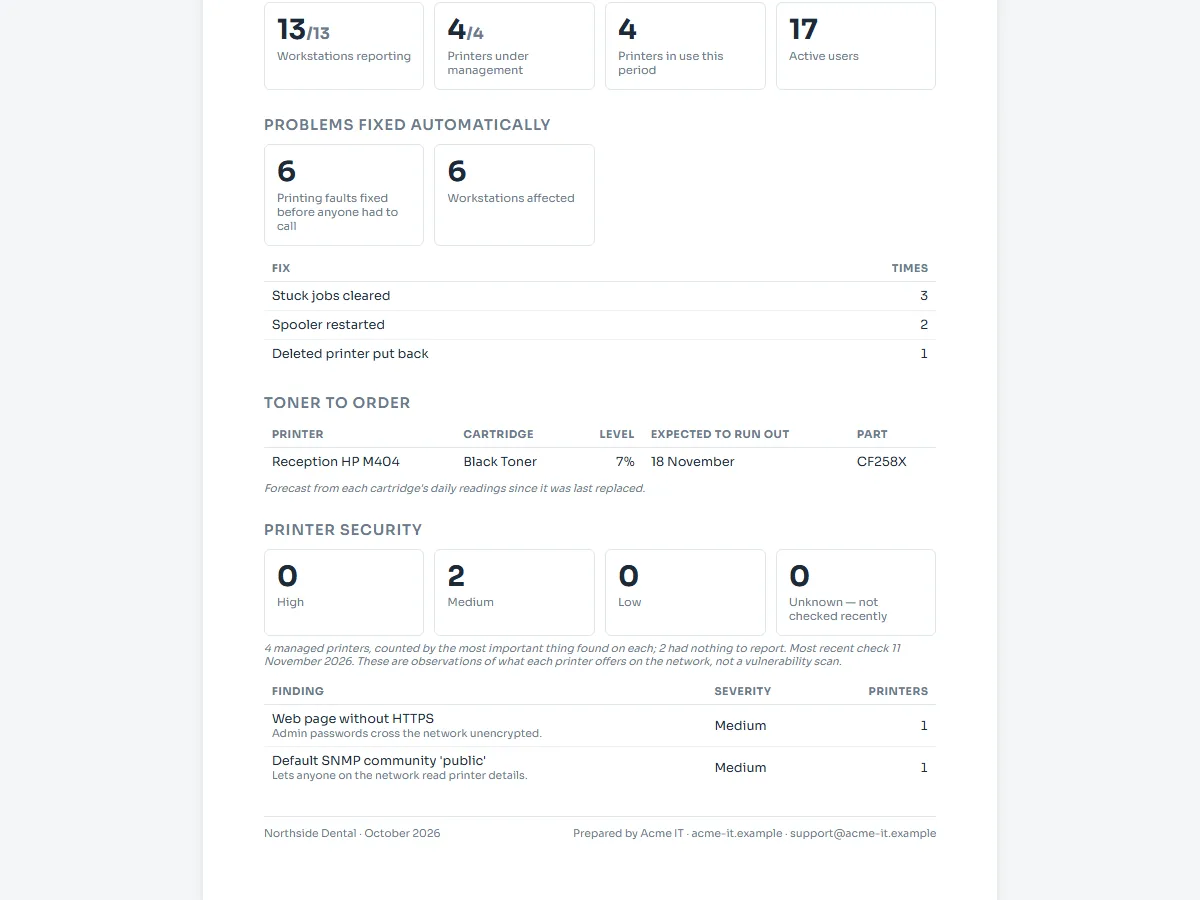


Every client separate, one portal for all of them
Per-client sites, policies and installers, reports under your brand that prove your value every month, and tickets straight into your PSA.
One less server to patch
A print server is a single point of failure, a monthly patch, and the reason printing stops when it reboots. Xenoprint moves its queues to direct printing, machine by machine, and never leaves anyone without a printer on the way.
- No print server to maintain, license or keep running
- Printing no longer stops when one server does
- Printers keep their drivers and settings, taken from the server itself
-
Pick the print server
See every shared queue on it, and how many machines print to each one.
-
Deploy them direct
Xenoprint collects each queue's driver and settings from the server and installs the printer on every machine that used it, straight to the printer's address.
-
Old connections go last
Each user's old
\\server\queueconnection is removed only once its replacement is installed on that machine.
Live at a site in an afternoon
Nothing to host and nothing to open on any firewall. The agent reaches out over HTTPS from wherever the machine is.
-
Install the agent
Each client and site gets its own installer. Run it on a machine, or push it with the RMM or Intune you already use.
-
Approve the machine
It appears in your portal within a minute and lands in its site by rule. Nothing joins without a person approving it.
-
Add a printer to the site
Every machine in the site installs it, and machines that join later get it too.
Remote printing
Print to a site's printer from home, another branch or the car park, as though you were in the building. No VPN, no port forwarding, nothing to change on anyone's router: jobs travel encrypted between Xenoprint agents, over the same outbound HTTPS they already use.
Made for organisations that answer for every machine
Clinics, police departments, law firms. Xenoprint's agent runs with full rights on every machine it manages, so most of the design is about one question: can anyone else make a machine run their code? The answer is built to be no.
- Two-factor sign-in for every user, and each organisation isolated on its own address
- Agent updates signed with a hardware key kept offline: a machine only ever runs an agent we released
- Only printer drivers certified by Microsoft are installed; anything else is refused
- No inbound ports, at your sites or on our servers
- Document names left out of print logs unless you turn them on
Questions
If Xenoprint goes down, does printing stop?
No. Printers are installed on each machine as ordinary Windows printers pointing at the printer itself, and printing never passes through Xenoprint. If the portal can't be reached, deployments, changes and reports wait until it's back.
Do I need to open any firewall ports?
No. The agent only makes outbound HTTPS connections, from wherever the machine is: the office, a branch, or someone's home.
Which printer drivers can I deploy?
Drivers certified by Microsoft (WHQL), which is how most manufacturers publish their standard Windows drivers, and the drivers that come with Windows. Upload a package, or collect it from a machine that already has the printer installed. Packages without a Microsoft signature are refused before anything is installed.
Is it only for MSPs?
No. It was built for MSPs, and it works the same for an IT team looking after its own offices, branches and departments: each client, or each part of your organisation, gets its own sites, machines, reports and installer. MSPs: see the MSP program.
How is it different from Group Policy or a print server?
Group Policy needs machines joined to your domain and on your network, and a print server is one more server to patch and keep running. Xenoprint works on any Windows machine with internet access, at any site, and keeps checking that the printers stay right.
Can you see what we print?
Print activity is recorded by machine, printer and user. Document names are not recorded unless you turn that on for a client, and recorded names can be purged.
What does it cost?
The beta is free for 30 days with unlimited agents. Pricing after the beta is being set now.
Try it on one site
Free for 30 days during the beta, with unlimited agents. No card needed.